Problem 1 – Python Hello World
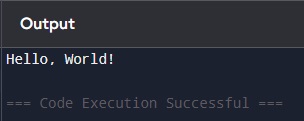
Write a program that prints the message “Hello, World!” to the screen.
Example
Hint
Use the print() function to display text.
Explanation
print()→ a built-in Python function used to display output on the screen"Hello, World!"→ a string (text inside quotes)- Quotes (
" ") tell Python: “this is text, not code” - When Python runs this line, it sends the text to the screen
👉 This is usually the first program because it shows how to display something
Solution

Problem 2 – User Input
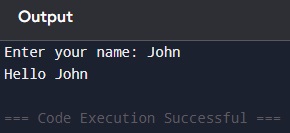
Write a program that asks the user for their name and prints a greeting message.
Example
HintUse input() to get user input and print() to display the message.
Explanation
name→ a variable (a container that stores data)=→ assignment operator- It means: “store the value on the right into the variable on the left”
input()→ waits for the user to type something"Enter your name: "→ text shown to the user- Whatever the user types is stored inside
name print("Hello", name)→ prints text + variable value
👉 Flow:
1. Ask user for input
2. Store it
3. Use it later
Solution
Problem 3 – Simple Addition
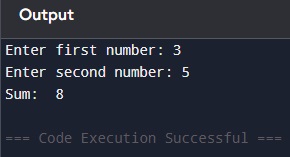
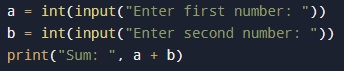
Write a program that asks the user for two numbers and prints their sum.
Example
Hint
Use input() to get values
Convert them to integers using int()
Explanation
input()always returns text (string)int()converts text into a number (integer)aandbare variables storing numbersa + b→ adds the numbersprint("Sum:", a + b)→ prints label + result
👉 Important: If you don’t use int(), Python will try to join text instead of adding numbers
Solution
Problem 4 – Python Even or Odd
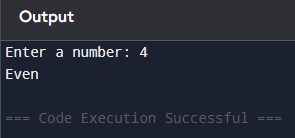
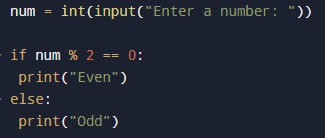
Write a program that checks if a number is even or odd.
Example
Hint
Use the modulus operator % to check the remainder when dividing by 2.
Explanation% → modulus operator (returns the remainder of division) num % 2:
- If result = 0 → divisible by 2 → even
- If result ≠ 0 → odd
if condition: → runs code if condition is true else: → runs if condition is false
👉 Example:
- 4 % 2 = 0 → even
- 5 % 2 = 1 → odd
Solution
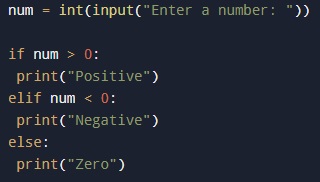
Problem 5 – Python Positive or Negative
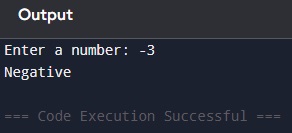
Write a program that checks if a number is positive, negative, or zero.
Example
Hint
Use if, elif, and else to compare the number with 0.
Explanationif num > 0 → checks if number is greater than zeroelif num < 0 → checks if number is less than zeroelse → runs if none of the above are true== means “equal to”
Conditions are checked top to bottom
👉 Flow:
1. Check positive
2. If not, check negative
3. If not, must be zero
Solution
Problem 6 – Python Print Numbers from 1 to N
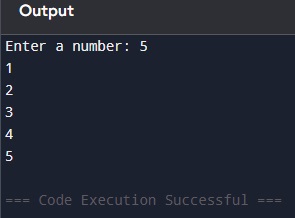
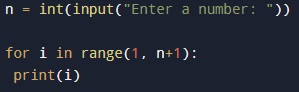
Write a program that asks the user for a number N and prints all numbers from 1 to N.
Example
Hint
Use a for loop with range().
Explanationrange(1, n + 1):
starts at 1
stops before n + 1
so it prints up to nfor i in range(...):
repeats code for each number
i takes values 1, 2, 3…print(i) → prints each number
👉 Loop = repeat action multiple times
Solution
Problem 7 – Python Sum of Numbers
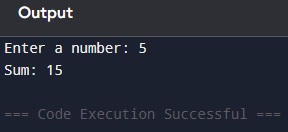
Write a program that calculates the sum of numbers from 1 to N.
Example
Hint
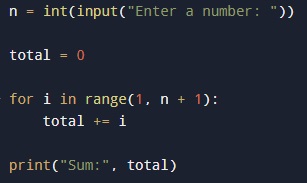
Use a loop and keep adding values to a variable.
Explanation
total = 0→ starting value (important for accumulation)- Loop runs from 1 to n
total += imeans:
total = total + i

Each loop adds the next number
Final value = total sum

👉 Example:
1 + 2 + 3 + 4 + 5 = 15
Solution
Problem 8 – Python Multiplication Table
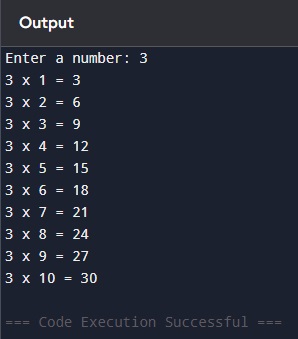
Write a program that prints the multiplication table of a number from 1 to 10.
Example
Hint
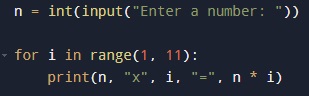
Use a loop from 1 to 10.
Explanationrange(1, 11) → numbers from 1 to 10 n * i → multiplies the number print() → formats the output
👉 This combines loops + arithmetic
Solution
Problem 9 – Python Count Digits
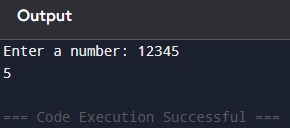
Write a program that counts how many digits a number has.
Example
Hint
Divide the number by 10 repeatedly.
Explanation
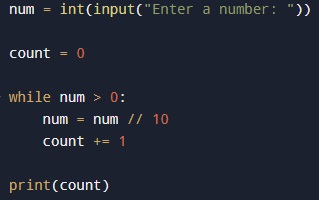
1. What is a while loop?
A while loop repeats code as long as a condition is true
Here, the condition is: num > 0
So the loop keeps running until num becomes 0
👉 In simple terms:
“Keep doing this while the number is still greater than zero”
2. What does // do?// is integer division
It divides the number and removes the decimal part
👉 Examples:
1 // 10 = 0
1234 // 10 = 123
123 // 10 = 12
12 // 10 = 1
👉 So:
Each time we divide by 10, we remove the last digit
3. What does += mean?
count +=1 is a shortcut for count = count +1
It adds 1 to the current value
Used to count how many times something happens
Full Logic Step-by-Step
Let’s say the user enter:
1234
Loop 1:num > 0 → True num = 1234 // 10 = 123count = 0 + 1 = 1
Loop 2: num = 123num = 123 // 10 = 12count = 2
Loop 3:num = 12num = 12 // 10 = 1count = 3
Loop 4: num = 1num = 1 // 10 = 0count = 4
Loop 5num = 0 → condition is false → loop ends
Final result
4
👉 Because the number has 4 digits
Simple summarywhile → repeats until condition is false
// 10 → removes one digit
+= 1 → counts how many times it happens
👉 Number of loops = number of digits
👉 “Each loop removes one digit, so counting the loops gives the total number of digits.”
Solution
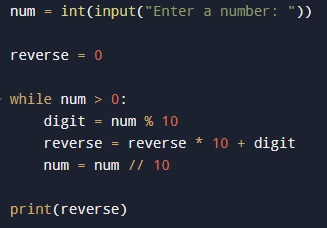
Problem 10 – Python Reverse a Number
Write a program that reverses a number.
Example
Hint
Use % 10 to extract digits.
Explanation
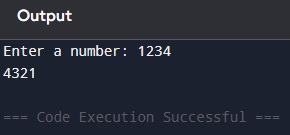
num % 10 → gets last digit
- 1234 → 4
reverse * 10 → shifts digits left
+ digit → adds new digit
num // 10 → removes last digit
Loop repeats until number is 0
👉 Example:
- Start: 1234
- Step 1: 4
- Step 2: 43
- Step 3: 432
- Step 4: 4321
Solution